mksquashfs for OS X

Here is a patch for compiling the mksquashfs tool on OS X:

squashfs-tools2.2-r2-OSX.patch

The compiled binary is here in case you’re too lazy to compile it yourself :) :

mksquashfs2.2-r2-OSX.tar.gz

This is what I use to generate a SquashFS image for my patched Zaurus kernel:

# cd somedirectory_to_compress
# mksquashfs . /Volumes/Zaurus/compressedimage.squashfs -le -noappend

If you’re using the kernel included with Cacko ROM, you don’t have to patch anything as SquashFS support is already included.

Finally, here is how to mount the image on the Zaurus:

# mount -t squashfs -o loop /mnt/card/compressedimage.squashfs /mnt/mountedimage

Smooth… (Part 2: Tweaking DejaVu Sans for Zaurus)

I’ve been asked by Guylhem to try to improve the free DejaVu font for display in Qtopia.
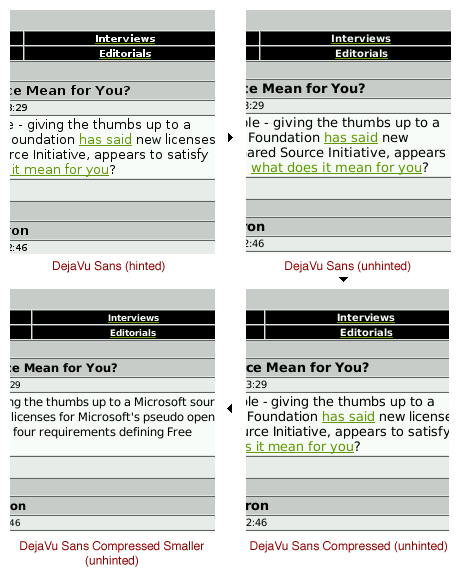
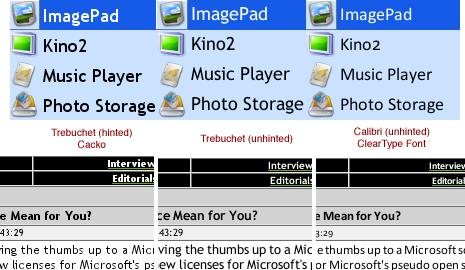
After some tinkering in FontLab I have a pretty nice result. Here is a comparison of the various stages:

Illustration2Illustration3

As I see it, the main problem with the DejaVu font (and Bitstream Vera therefore) is the spacing between the glyphs which tends to be too wide. This is observable in Windows and Qtopia. Especially on a PDA screen this is not a pleasant view.
So, what I did was to create a tweaked version of the font, again using FontLab.
Lowering the left and right sidebearing of each glyph by 18% resulted in the “DejaVu Sans Compressed” version you can see on the screenshots.
Now, still finding the glyphs to be too big, I applied a 90% scaling to each. In my opinion the resulting version “DejaVu Sans Compressed Smaller” looks really nice and comes very close to the quality of the C*libri font.

I’ve made the fonts available here:
http://katastrophos.net/zaurus/fonts/helvetica-replacements/free/

You can find additional screenshots here:
http://katastrophos.net/zaurus/fonts/helvetica-replacements/

Smooth… (Part 1)

Ever since using my Zaurus I had this idea of having OS X style smooth fonts in Qtopia. While the Trebuchet font introduced with Cacko was already good, it still didn’t cut it.
Today and after tinkering a while with FontLab and makeqpf I finally came up with something very close to the font smoothness known from OS X.
Illustration

I removed the hinting from the font via FontLab, so the FreeType2 rasterizer in makeqpf could do the full antialiasing magic. The unhinted Trebuchet font seems to lose some of the crispness of the hinted version, however, the Zaurus screen with its higher contrast almost alleviates this effect. Clearly, special Cle*rType fonts like C*libri, C*ndara and C*ndel really live up to their promise as soon as hinting is removed – even without sub-pixel rendering they look superb on the CG Silicon screen. :)

Screenshots:
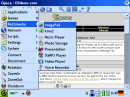
Screenshot Trebuchet (hinted) Screenshot Trebuchet (unhinted) Screenshot Calibri (unhinted)

Sadly, most font-related settings are hardcoded in Qtopia 1.5.x. The only sane way to change the font globally is to replace the standard “helvetica” font with a replacement font…

Update 3 (December, 9th 2005): Downloads of Trebuchet and C*libri fonts have been removed. Please use the open-source DejaVu font in Part 2 instead.

Update 2: You can find Part 2 here.

Update 1: I’ve made some additional font packs and the makeqpf tool available here.

slimp3slave for Zaurus

If you know SlimServer you probably also know how well it works in combination with iTunes. It basically serves your iTunes library and all its playlists to any device that can play MP3 streams. Now, it’s fairly easy to play this stream on a Zaurus. But what if you also want to control what is played without having to resort to SlimServer’s webinterface?
Meet slimp3slave. This little console application emulates the Squeezebox/SliMP3 player and with its iPod-like interface it’s a real breeze to use.

Just in case you want to check it out, I’ve made the compiled ARM binary available here:

slimp3slave-0.4-zaurus-bin.tar.gz

Since I’ve made some Zaurus specific changes, here are the sources:

slimp3slave-0.4-zaurus-src.tar.gz

Note: You’ll also need madplay if it’s not bundled with your ROM:

madplay-0.73-zaurus-bin.tar.gz

Mini_fo, gzipfs for Zaurus

I’ve been running Debian on my Zaurus for quite some time. Lately, this Debian setup grew to about 70% of my SD cards space. Definitely time to take action if I still wanted to take some music files with me!
While thinking about several solutions to this problem, I came to the conclusion, that compressing Debian would be a viable (if not the only) option.
The idea is to put all static parts into a SquashFS image, which offers a great compression/speed ratio. However, with SquashFS images being read-only, I had to come up with a solution to stack a writeable area on top of this image. Read more about it here.

I’ve made the patched and compiled modules for Mini_fo and gzipfs available on my server here.

Optimized GR32_Polygons.pas

As previously mentioned on the Graphics32 newsgroup I’ve made initial optimizations to the GR32_Polygons unit.
This version fixes several inefficiencies and a major performance issue mostly noticeable with the standard memory manager. Initial benchmarking shows a 2.2-fold performance increase.
If you want to give it a try, you can download the version here:

GR32_Polygons.pas

I’m still working on some other improvements not included in this file.
Please let me know, how it performed for you.

Giving up…

I’ve been planning for years (!) to create my private homepage publishing my efforts in several areas. Now, since everybody is busy blogging these days, this seems to be the next best less-timeconsuming thing to do. :)
So, this is me entering the blogging-sphere – hopefully with some useful information.
I need to play catch-up with posting several mini-projects and tips that are already finished, so this is what’s comming up next.