UPDATE: This also applies to Windows 7 Final/RTM (7600) and will also work for the U820/U2010/U2020 models. Check my comment for additional information on what needs to be installed on those models.
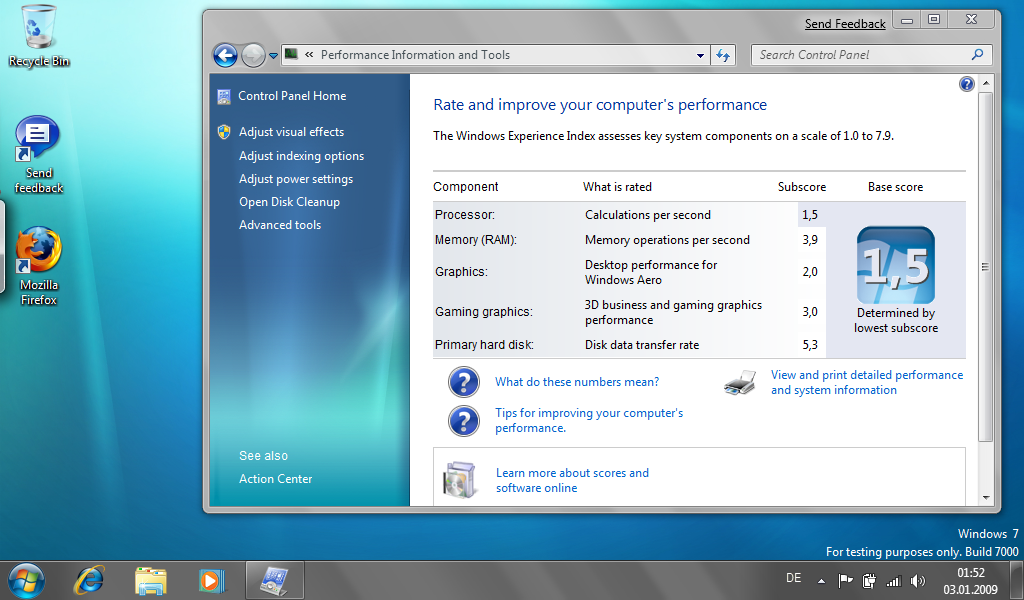
I just installed Windows 7 Business Build 7000 on my U810. It is quite nice actually and seems to run faster than Vista.
I installed the Vista drivers from the driver CD. The Setup.exe on the driver CD will complain that the operating system is unsupported. To circumvent this problem, just start the setup in Vista compatibility mode:
Right-click on “Setup.exe”, “Properties” -> “Compatibility” -> “Run this program in compatibility mode for:” “Windows Vista”.
Install these items:
Drivers
04. Button Driver
05. Camera Driver
07. Fingerprint sensor (driver)
08. FUJ02B1 Device Driver (HotKey Driver)
09. FUJ02E3 Device Driver (System Extension Driver)
11. Pen Driver
12. Pointer device driver
Utilities/Applications
03. Button Utilities
07. Fujitsu System Extension Utilities
I could not get the Auto-Rotation feature to work. Also, you’ll probably have to calibrate the touch screen.
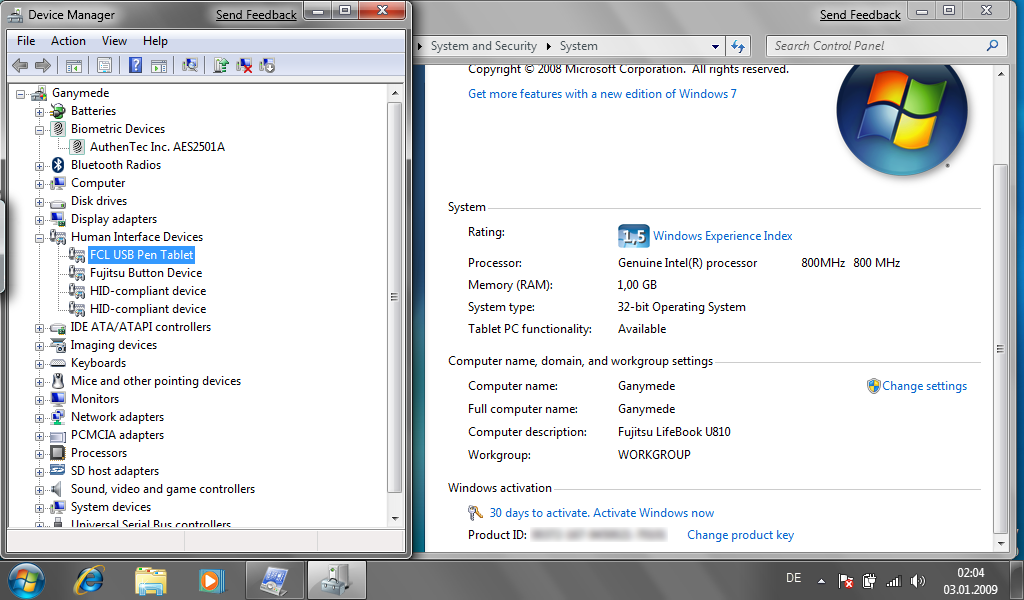
I also disabled the power management feature of the FCL USB Pen Tablet in Device Manager (Right-click on “Human Interface Devices/FCL USB Pen Tablet”, “Properties” -> “Power Management” -> Disable “Allow the computer to turn off this device to save power”). This improves the response of the touch-screen/tablet.
Oh, and BTW, Windows 7 “only” uses 7.5 GB of disk space, whereas Vista uses 15 GB I think.
Yeah, I just found the same result myself last night.
Hopefully Fujitsu will update the rotation software for us.
Make sure you run the updates. Then check the “Action Center” icon. On my Win7 install on u810 it auto-notified me that there was a Win7-specific driver for the Fingerprint sensor (Authentec). With this driver I was able to integrate sensor directly into Windows using the “Biometric” applet in the control panel. Quick Windows login via the sensor without using Omnipass bloatware… \o/
Thanks for this page – very helpful!
Did you get the sound to via the earphone/headphone jack? Even when speakers or earphones are plugged in, it still sends all sound out the built-in speakers.
Also, for some reason it does not seem to recognize my fingerprint scanner, and I tried what Andy suggested.
Has anyone had any success in getting the driver installed for the WWAN version of the U810? If so, could you describe how you did it.
Thanks for the info. It was very helpful.
Help! I cant seem to get the fingerprint working. Would anyone have the disks I could download? It runs well on Windows 7, I just never got the disks when I bought the 1010.
I did not try the fingerprint driver, but the sound has apparantly been fixed in the latest BETA (7077).
http://www.gottabemobile.com/forum/forum_posts.asp?TID=7200&PN=2
Hi, I installed the Windows 7 RC1 just before, and I have a very annoying phenomena with the stick of the pointing device : it is inversed …
I mean that before, I pushed it went up, I pulled it went dowwn. Now it is inversed and I do not found the parameter to reverse it. What is interesting is that when W7 boots, after log in , there is a blue screen, and at this step is works well, then the desktop is displayed and… it is inverse.
Great post. Im using windows 7 RC build 7100 and the rotation and everything else works perfect! Im so happy, thanks very much for the post. People who is thinking to upgrade from windows vista, dont do it, its terrible. Install windows 7 fresh!
The same instructions will work for the final RTM release of Windows 7 (7600) and will also apply to the Fujitsu U820 and U2010/U2020.
Make sure to also install the GPS driver. The pen driver is not necessary since Windows detects the touch screen. The only thing to do here is to calibrate it via Control Panel > Tablet PC Settings.
Drivers for the U820/U2010/U2020 are available here:
http://www.pc-ap.fujitsu.com/support/drv_lb_vista_U2010.html
Hi, I am having problems with the fingerprint sensor, I installed the RTM (7600) version, and the system recognized the sensor and install the driver automatically “Authen Tec AES2501A”, then I go to the control panel, and the finger print sensor is listed, but when I open the figerprint configuration utility of windows 7 the software dont detect when I pass my finger on the sensor, could you help me please
Thanks in advance,
Joaquin
Hello all,
I installed RTM 7600 win7, and it looks good. But I have these problems.
I am not able to calibrate the screen as many pen presses for the points on the R side of the screen are not recognised. Also i have this problem of the cursor moving in the opposite direction to the pointer. If anybody has some ideas please help me ,
thanks in advance,
jebaraj
Jebaraj, this happened to me on the U810. I had to install the Fujitsu Touch Panel drivers. As for the direction problem, you’ll need to install the Pointing Mouse Vista driver from the Fujitsu support page. The default Win7 mouse driver does not detect other screen orientations.
Joaquin, is this on a U810 or U820? I had problems on my U810 back when I was testing the Beta version of Win7. Have not tried with the RC or RTM version because I do no longer own the device.
Hi Andre,
Thanks for a prompt reply. My experience was a bit different. I managed to solve the problems.
I installed the latest touch panel drivers for vista and it did not help, but when i install the latest BIOS updtae then the calibration went smoothly and it works well now.
For the direction of the pointing device, I had realized that before I installed the pointing device driver, the pointer was fine and so I uninstall the driver from the programs and it works well
thanks a lot
Jebaraj
I still cant get the button utility installed-have checked vista and run as administrator but apparently am doing something wrong.
Well I installed Windows 7 Ultimate, and everything runs well – Omnipass won’t work (only version 7).
How to install:
– First install Winows 7 from Boot-DVD
then:
a)install – Fujitsu System Extension Driver (FUJ02E3) (from LiveBook U810 /U1010) [V.1.209]
b)install – Fujitsu System Extensions Utility (from LiveBook U2020 /U2010) [V.2.60]
c)install – Fujitsu Button Driver (from LiveBook U2020 /U2010) [V.4.1.0302.2008]
d) install – Fujitsu Button Utility (from LiveBook U2020 /U2010) [V.7.02.0625.2008]
e)uninstall – Fujitsu Button Utility (from LiveBook U2020 /U2010) [V.7.02.0625.2008]
f)install – Fujitsu Button Utility (from LiveBook U810 /U1010) [V7.00.0910.2007] –> now all Buttons in the panel work well
g)install – Mouse Device Driver (AlpsPoint) (from LiveBook U810 /U1010) [V.7.0.403.6] –> now the mousepoint works correcly (the click)
h)install – Touch Panel Driver (from LiveBook U810 /U1010) [V.10L04]
i)install – a) ACPI Device Driver (FUJ02B1) (from LiveBook U810 /U1010) [V.1.23] –> for unknow device
j)install – b) Camera Driver (from LiveBook U810 /U1010) [V.1.1.0.0] (insallation over device manager)
k)install – c) FingerPrint Sensor Driver (from LiveBook U810 /U1010) [V.7.7.1.7]
Best regards from Germany
EB [U810 Fan :-)]
i)install – ACPI Device Driver (FUJ02B1) (from LiveBook U810 /U1010) [V.1.23] –> for unknow device
j)install – Camera Driver (from LiveBook U810 /U1010) [V.1.1.0.0] (insallation over device manager)
k)install – FingerPrint Sensor Driver (from LiveBook U810 /U1010) [V.7.7.1.7]
PS: Calibration works well with the fujitsu calibration
For all who can’t calibrate well.
– the fujitsu drivers for the touch panel are in a zip (TP_USB_Vista32_V10L04.zip)
– the “CalTUwin.exe” is inside the zip too
– for first calibration use “CalTUwin.exe”, then you use the calibration form “Control Panel|Hardware and Sound|Tablet PC Settings|Calibrate the screen for pen or touch input” –> now the calibration is exactly!!!
EB
Elias, thanks for the update! :)
After installing Win7, my mouse is inverted
I use a Lifebook U Series – Model U810
Pushing up on the mouse controller moves it down; pusing left moves the pointer right, etc.
any idea how to fix this?
OK – fixed the mouse problem. uninstalling and deleting the driver triggered a re-install after reboot and that fixed the issue
I would like to install Wiondow 7 to U1010. Should I use the Vista driver, XP driver or XP tablet driver?
Hello John,
use the Vista drivers :-)
EB
ELiasB, Thanks much for the info. Followed your instructions and my U810 is running Windows7 great now, buttons working and pointer clicking! THANKS.
Is everybody here get the keybord LED working?
Hello Ronny,
follow my installation steps, and everything will run. :-)
EB
I have been trying to get Win7 to work since Christmas with zero luck. I’ve been following the directions precisely. My first problem may be that the FUJ02E3 is only available at V1.20 and not V1.209. Can someone link in the location of V1.209? Thanks
Hello GasPath,
you can use the FUJ02E3 V1.20 –> the 9 is a typing error from me.
I’ve used the V1.20.
EB
Anyone trying to do this…worked for me only after following EB instructions exactly (even the odd install, then uninstall, instruct.) Got some of the downloads off Fuji’s download site for the U820, W7 downloads.
EB: still wondering how you figured this out? Fuji support said W7 wouldn’t work.
@ SLL
Try and Error :-)
And make notes after alls steps, that work or fail :-)
EB
Hi Elias, I install the Win7 Ultimate and then installed the drivers by following your instruction. Everything looks fine except screen rotation. I got a pop-up window with the error message “Error in CUISDK initialization” Please help. Thanks in advance.
Hello Howard,
I don’t exacly know, what this error message means, but I think it could be an error form the touch panel driver.
Please try to uninstall the “Touch Panel Driver (vom LiveBook U810 /U1010) [V.10L04]” and reinstall it after reboot.
Someone here, who can help or knows more about this message?
EB
Thanks for your reply Elias. The error message was from the Fujitsu Rotation Utility. Do you know how to reinstall it? By the way, there are Win7 driver for U2010, can I use those drivers instead of the Vista drivers?
@Howard, try it – maybe it will work
FINGERPRINT SENSOR working now!!!!
For workaround see here:
http://www.brettg.com/2009/08/12/windows-7-and-the-fingerprint-reader-no-more-omnipass/
For downloading files:
http://www.authentec.com/win7update/W7Wbf32.exe (32bit)
http://www.authentec.com/win7update/W7Wbf64.exe (64bit)
@ Andy –> Viele Grüße nach Oldenburg :-)
Are there any places in the above directions where the machine should be shut down and rebooted? The only button I have that works is the keyboard. This is so frustrating. I don’t know how many times I and others have done this with no luck.
@ mcolvin
Ohhh, yes sorry – this is a big fault from me to tell you – because I usually always reboot after I install or uninstall something.
After each install & uninstall you should boot!!!
Thanks. I still don’t have the autorotate working but the three buttons work. The rotate will work when I go back to landscape but not when I first rotate to portrait. I have to rotate to portrate manually with the button, but then the autorotate will go back to landscape-go figure. This is as close as I have gotten it so I am afraid to do anything else!
Here is the site you can download the drivers from:
http://www.pc-ap.fujitsu.com/support/drv_lifebook.html
you can download the mouse driver for 2020 and win7 and it installs ifyou get errors with the 1010 one.
Update regarding the error on the Screen rotation:
found a davlan blog site:
I also receive this odd “error in cuisdk initialization” when I tried to rotate. At first I thought it was the button driver/utility installation problem in xp/vista but I realized it was actually a video driver problem. I installed the vista version (choose compatibility mode option when it fails regularly because it’s not designed for windows 7) and it selected override the current version which was 8.5 or something to the 7.14 version. A reboot later and I was auto rotating by swivel or manually rotating by button; no problems.
Kunchi, Are you saying the mouse drivers from 2010/win 7 may help my autorotate or were you assessing something else?
no i had errors with mouse when i used the one from the 810/1010, the one for the 2020 win7 worked for that, my second post talks about the error on rotate.
I’ll look for the video driver. Not certain I know what it is.
Thanks Andre, and EliasB!! I just used your files and instructions and Windows 7 works great! This breathed life into a previously sluggish device.
Has anyone had trouble with SD card reader? Mine had worked before but is not seeing the cards (have tried several) anymore. No error messages or anything, just nothing happens when insert. Any suggestions? EB??
Also…not sure if related or not but occasionally have similar issue with some USB portable hard drives.
Oh yeah…U810 w/ W7
@ SLL,
I only updated with Windows Update, everything is working fine, SD-Card & USB.
“Oh, and BTW, Windows 7 “only†uses 7.5 GB of disk space, whereas Vista uses 15 GB I think.
Yeah you thought right, with the OEM instalation only as it has got recovery partition, lots of wall papers etc.
So what I did, formatted the whole drive and made two partitions (15G+25G)approx. and then tried Vista ultimate first just to see the performance. It was faster then the OEM & took less then 10Gigs. Then I’ve installed WinSe7en Ultimate32, installed all the vista drivers & software, from the Fujitsu site. At first the keyboard light & Rotation keys were behaving funny. So I’ve uninstalled the U1010 SystemXtension utility and put the U2010 one. That’s all. Auto rotation, manual rotation, input panel, key board light, fn key & up down keys all are working perfectly except the Alt key. near biometric sensor. But if I hold that key it acts as Alt+Ctl+Del. Haven’t tried much though. With the older display driver, calibration is not perfect in win7. so download the latest driver from Fujitsu site.
Now you’ve got a supper fast UMPC.
hello, i just got fujitsu lifebook t2020 from ebay.. i know, that it ist the best performance lifrbook ever but its good for me by for now it has recomended widnodws vista but when i turned it on there was windows XP tablet version.. so i decided i want there win7.. and i would like to ask if that manual from EliasB will work for me too.. Well this pc tablet i have has double core processor 1.4GHz and 2GB RAM with 150GB HDD i think that is possible to update RAM up to 4GB and i think it would not be so big problem to do that, and i would like to know if the win7 can work on this tablet.. if there would be sombody who would know if that works, please answer ;)
Run Windows update or download win7_1512754 (8.15.10.1930) from softpedia for autorotation
Follow the steps from the guy above.. The long one then install the driver for auto rotate to work
When someone needs the package again, because it was deleted; I uploaded it to my Blog
http://www.martin-hoefer.de/WordPress/index.php/2010/04/fujitsu-u810u1010-installing-windows-7/
Eventhough a workaround for the fingerprint sensor.
Martin & EliasB
Thanks for posting the valuable information. your blog provides the excellent topics what am I always looking for.
Hi EliasB, thank you very much for the information. i just bought u810 (2nd) from china, and i get XP tablet PC for the OS (included). i wanna ask you something, you use windows 7 ultimate or what ? is it same right if i use windows 7 home premium ? thnx for the info again.
Regards,
DaviD
Hello David,
I use Windows 7 Ultimate, but I think it will work with Windows 7 Home Premium too.
Martin
thank you martin for the information..
regards,
DaviD
Hi EliasB and Martin, i think i need some information again. i already installed windows7 ultimate in my u1010 and also already follow the instruction. but 1 think i can’t find is WEBCAM application. i can’t find the webcam application everywhere, im try to search but nothing. can u help me to solve this problem ? your response will helpfully me. thank you very much.
Regards,
DaviD
@david
You can try to download the driver for u1010 here
http://www.pc-ap.fujitsu.com/support/drv_lb_vista_u1010.html
tried to following the instructions but the installation fails on “f)install – Fujitsu Button Utility (from LiveBook U810 /U1010) [V7.00.0910.2007] –> now all Buttons in the panel work well”
it just bombs out and windows says “fjcpfile has stopped working”
any ideas?
Try the official drivers:
http://www.pc-ap.fujitsu.com/support/drv_lb_win7_U2010_W732.html
hi ash,
did you reboot after every install?
d) install – Fujitsu Button Utility (from LiveBook U2020 /U2010) [V.7.02.0625.2008]
reboot
e)uninstall – Fujitsu Button Utility (from LiveBook U2020 /U2010) [V.7.02.0625.2008]
reboot
f)install – Fujitsu Button Utility (from LiveBook U810 /U1010) [V7.00.0910.2007] –> now all Buttons in the panel work well
————————
Elias wrote here in this blog additionally, because I he forgot to say:
EliasB Says:
January 24th, 2010 at 20:39
@ mcolvin
Ohhh, yes sorry – this is a big fault from me to tell you – because I usually always reboot after I install or uninstall something.
After each install & uninstall you should boot!!!
————————
Martin
Yes, i rebooted everytime.
Its cool now. I used the u2020 windows 7 version on my u1010 and seems to work.
Just noticed the auto rotate does not work. Tried to install the win7 drivers but it says my system does not meet the mini requirements?
Hi ash,
install
h) install – Touch Panel Driver (from LiveBook U810 /U1010) [V.10L04]
again
touch panel driver already installed as per the instructions ;o)
opps i forgot to mention. it does do something i.e. the busy icon but the screen just does not rotate!
Wonder if its becuase i got the win 7 button driver & utils for the u2020 on my u810/u1010
I’m getting a u810 very soon in the mail. I have questions on best OS.
Which is appropriate for the fastest in memory program (no file writing to disk):
XP Tablet, Vista, or 7?
32 bit or 64 bit?
Primary software I’ll be using: Delorme Topo.
Maybe I’m expecting an answer for too broad a question that I’ll have to find out myself. Fair enough. Having installed OEM XP’s in the past, Vista and Win7 are not hobbyiest friendly these days I’m told. So I’m reluctant to buy the Retail Full install for Win7 (about $200) and realize it’s too bloated for the u810’s 1gig of ram and CPU speed. But people here seem to be running Win7.
Are the gain’s worth it over the previous two OS’s.
Sorry, I meant that last paragraph to be a question that I would like some feedback on. Thanks.
I installed win 7 works fine but wish I had just kept XP which also was great and I was a more familiar with, less tweaking for this set up! If you do install Win 7 follow instructions above EXACTLY and will work.
Well I finally got all the drivers installed but opted out of installing the fingerprint scanner — disabled it. So all is well with Win7 and my u810.
There’s one thing tho that’s been troubling me. When I checked System Information the Toshiba- MK4009GAL ATA Device (standard fixed disk drive) reports 512 Bytes/Sector. I did a fresh install of Win7 over a previous OS. I’m not sure, but shouldn’t Win7 optimize drives at 4kB/sector by default?
Also, the Partition Starting Offset value is 32,256 bytes. Is there an block alignment issue with that value that might slow down disk access?
I’ve got other questions but I’ll need to do more research on the possible DMA and PIO issues.
I’m pretty much a noob on these matters, so any wisdom would be much appreciated.
Well the ATA controller shows up as UDMA 5 capable with a HD throughput disk test averaging 15 MB/sec — seems about right.
Still, I’m unsure given what the System Information reports as to whether the previous owner of my u810 actually formatted the Partition Starting Offset on a misaligned sector boundary.
I know the info is there. I just don’t know to what extent of a performance hit there might be on a Win7/XP Pro tablet dual boot system I’m trying to set up on the U810.
I’m still fuzzy on what it all means and I’ll eventually chase down the answers, but can someone please clue me in on what I might be overlooking here given what the System Information report states?
1.8″ PATA HDDs are slow. These drives are all 512 bytes per sector, same goes for most other HDDs sold today. You only need to take care of the partition alignment with (MLC) solid state drives or the newer 2+ TB drives that are explicitly 4KB per sector. So, no need to worry.
However, I would recommend getting one of the PATA SSDs as these are way faster and more durable than those slow 1.8″ HDDs. Check here: http://katastrophos.net/andre/blog/2011/04/25/upgrading-the-fujitsu-u2010-with-a-new-120gb-ssd/
Speaking of SSD’s, my 60 Gb Renice K3VLAR PATA finally arrived and a U820 and an Asus R2h with a 2GB upgrade are one their way.
Thanks Andre for allaying my fears over the limitations on the typical older technology drives. The K3VLAR may not be a speed demon, but it’ll live nicely in one of my UMPC’s.
Hmmm, which one deserves the K3VLAR I wonder? :O)
I have been using Vista (tweaked) since I bought my U810, christmas 2 years ago.
This week I decided to try Win7 (Pro, OEM, SP1) after reading everything I could find about how to do it.
I’d like to thank the folks who have taken the time to figure this out – it went smoother than I feared.
However, I have not been able to get Auto-rotate to work. It rotates fine by the button, but does not AUTO-rotate when you swivel the lid like it used to in Vista. I tried the video drivers mentioned, but it didn’t seem to do anything. Not a huge deal as I rarely swivel the screen, but would be nice to work it out.
I also have an odd issue with Bluetooth, which I will try to explain.
At first I was just using the Microsoft bluetooth drivers that auto-installed with the OS and they seemed to work just fine. That is until I hibernated my system after using the bluetooth (headphones). I’d listen to music or whatever (VLC or WMP) and then stop listening, turn off the headphones and when I was done with the PC, I would hibernate it. Come back and want to listen to music and whilst the system thinks it is sending a signal to the headphones, it never arrives at the headphone, yet I can go into properties and “test” the sound and get the test signal to tinkle in my ear.
I tried it with “Sleep” instead of hibernate and same deal. Yet if I restart the system, all is well until I hibernate. But I am not going to restart my system every-time I want to use my headphones. I’ve tried both the U810/1010 Vista drivers and the 1010 Win7 drivers with no better results.
One thing I noticed is that the Win7 bluetooth, even with the real drivers (as opposed to Microsoft drivers), is missing the “Quick Connect” option and there seems to be no way for the user to “Connect” though there is a “Disconnect” in the fly-out. But even when I hit disconnect, and tun off the headphones, if I go into properties, it says the headphones are connected, which I’m thinking might be the issue – the system is not recognizing that the headphones have been powered off and are NOT connected…
So would anyone have any ideas or solutions? Has anyone noticed this issue themselves?
Hai…, new to join….
I had a problem with my u810, I installed win 7 installed almost all the driver but I cannot install touch pen driver always pop up installation isn’t complete can anyone help me and also the three buttons did not work…. I try to inslalled and uninstalled for several time still not working….
after messing with countless linux distributions on the u810, i ended up installing win7 and following the installation instructions on this page. in my case, the u810 is a joy to use again.
Anyone going to try windows 10 on u810
I installed Windows 10 on my U2010, but the 1 GB of RAM are a real issue. Windows 10 TH2 includes memory compression which seriously hampers the CPU since the device’s RAM is almost always completely used if you start Firefox for example.